I attended and spoke at Mandiant's MIRCon last week. It was a really good conference, not even counting that it was free. I have uploaded by slides from my talk and they can be downloaded here:
Forensic Crash Dump Analysis
I probably skipped over a lot of the details and did not leave people enough time to write down all the good registry and windbg tidbits. I am looking forward to the conference next year. I am working on getting the MIR scripts and shell scripts released and will be posted on this blog when they are released.
Monday, October 18, 2010

Monday, August 16, 2010
Good Malware Blogs and Job Posting
I just got done with my morning blog roll reading and wanted to link to a couple of good entries. The first was by Zynamics talking about creating better malware signatures:
http://blog.zynamics.com/2010/08/13/privatesigs/
It specifically talks about creating signatures with their product VxClass. If you have not had a chance to use or see this product I suggest you do. The second blog entry worth re-posting was one from Nick Harbour at Mandiant. His post talks about finding command and control functions in malware, specifically focusing on the COM point of view, here is a link to the post:
http://blog.mandiant.com/archives/1396
Finally I would like to advertise a couple of positions that are open at my current work place. My team is looking for forensicators, incident responders, red teamers and malware analysts. If you are interested in the job apply at the link below:
http://www.hr.lanl.gov/JobListing/SingleJobAd.aspx?JobNumber=217724
http://blog.zynamics.com/2010/08/13/privatesigs/
It specifically talks about creating signatures with their product VxClass. If you have not had a chance to use or see this product I suggest you do. The second blog entry worth re-posting was one from Nick Harbour at Mandiant. His post talks about finding command and control functions in malware, specifically focusing on the COM point of view, here is a link to the post:
http://blog.mandiant.com/archives/1396
Finally I would like to advertise a couple of positions that are open at my current work place. My team is looking for forensicators, incident responders, red teamers and malware analysts. If you are interested in the job apply at the link below:
http://www.hr.lanl.gov/JobListing/SingleJobAd.aspx?JobNumber=217724
Tuesday, August 10, 2010
$MFT Parsing EnScript

There is a considerable amount of forensic goodness in the $MFT on NTFS partitioned disks. What is a $MFT? Well the $MFT is the master file table on NTFS partitions that is a kind of database that keeps track of all the files on the partition including its location and metadata about the file. I am not going to delve into the depths of the format of NTFS because it has already been explained in numerous books like File System Forensics by Brain Carrier. What I am going to do is quickly summarize the "goodness" available in the $MFT and how you can extract this data with a EnScript I have authored.
The $MFT contains an entry for every file and directory on a partition including itself. Important metadata with in a $MFT are the name of the file, inode number, standard information attribute, file name attributes and data attribute. The size of a $MFT record is 1024 bytes. Below is an example of a $MFT record:

The header of a $MFT record is "FILE0". A $MFT record entry can contain the contents of a file if the size of the file fits into the allotted size for data attribute. Below is a $MFT record broken down into what I think are its important parts.
 The standard information attribute (SIA) will contain the file times most people are used to seeing on the file system such as created, last written, last accessed and last modified. These times can also be easily changed by the attacker, the "worst" forensic problem ever until now because now you will know about the file information attribute (FIA). The FIA stores dates associated with the file's name and parent directory. These dates cannot be altered using Windows API calls like the SIA can. The meta data kept in the file information attribute consists of the file name creation date, file name modified date, file name last written and file name last accessed. Comparing the SIA to the FIA can detect the dreaded timestomping but be aware of the number of times this happens on a non-compromised or purposely altered system so stick to time windows when doing this type of analysis. To find all these times you are going to have to parse them by hand, wait no you don't there's a script for that below:
MFTParser.EnScript
The EnScript I created, inspired by Keith Gould, will parse the important information mentioned above for you and provide you with a tab separated text file you can open up in Excel or parse with your favorite awk command. Don't worry I am not forgetting about the $MFT slack section mentioned above in the important parts, I will go over it in the next post.
Wednesday, June 30, 2010
Page Files
I have not posted in a long time....seems to be a bit of a pattern but I should be posting more in the next couple of months with some new EnScripts. Before those posts though I wanted to point people to a great blog on why acquiring page files the same time as memory is a more complex problem than you would think.
http://blog.mandiant.com/archives/1102
Enjoy
http://blog.mandiant.com/archives/1102
Enjoy
Sunday, July 19, 2009
HP MediaSmart and Apple Support
This post is off topic but I thought it would be interesting to a large audience. I have had a HP MediaSmart 470 home server for about a year. I have enjoyed it was a file server for my home network and have been able to stream music and video to my PS3 seamlessly from it. It also serves as a nice print sharing server as well. I have been able to easily upgrade the RAM on the system from 512MB to 2GB and easily add a few TB's to its storage capacity. I have not used the other features of it such as photo sharing or page hosting. One feature I had not used at all was the system back up feature. Most of my home systems are Apples so I never had the need for a windows backup feature. About six months after I bought my HP MediaSmart, HP announced the feature on their new MediaSmarts would support Apple Time Machine backups. I was excited but disappointed with this new feature because I just bought mine and wondered if I should go get a new one just to have the Time Machine back up feature. I could not justify this purchase so I searched the forums and web for the support of a MediaSmart backward compatibility for about three months with no avail. About a week ago I stumbled across the MediaSmart support page and noticed a link to the download of the MediaSmart client support for OS X. The software for the client can be downloaded below followed by the installation instruction link.
OS X Client
Installation Intructions
Installing this client is pretty straight forward. By default with the older HP MediaSmart server the Time Machine backup feature won't work. It will complain about not having a "MAC" folder on the server. This is easily fixed by creating a "MAC" folder in the root share folder of the MediaSmart server. The folder layout should look like the figure below:

Once this folder is created you can open up the Time Machine preferences on your Mac and backup to the HP MediaSmart Server. I have two Mac systems backing up to the MediaSmart and it has worked well so far. I would recommend the HP MediaSmart to anyone looking for a fileshare, printshare, or backup solution for their home network.
OS X Client
Installation Intructions
Installing this client is pretty straight forward. By default with the older HP MediaSmart server the Time Machine backup feature won't work. It will complain about not having a "MAC" folder on the server. This is easily fixed by creating a "MAC" folder in the root share folder of the MediaSmart server. The folder layout should look like the figure below:

Once this folder is created you can open up the Time Machine preferences on your Mac and backup to the HP MediaSmart Server. I have two Mac systems backing up to the MediaSmart and it has worked well so far. I would recommend the HP MediaSmart to anyone looking for a fileshare, printshare, or backup solution for their home network.
Friday, January 23, 2009
Cool Tools and DoD Cybercrime Conference
For the past two weeks I have been doing web application assessments. During this process I have had to try different tools to get the job done. During the trial and error process I can across some really cool tools, they are probably not new but new to me. The first is Charles proxy. This proxy is great for doing binary web application assessments allowing you to easily view the binary data being passed. A screen shot of Charles in action is below in Figure 1.
You can get the Charles proxy here.
Since I was looking at flash applications I needed analyze the swf file. While searching for a decent decomplier I found FileInsight by Secure Computing. Get FileInsight here:
This tools is great. It is a hex editor with collaborative reverse engineering in mind. Besides being a hex editor it allows you to do a number of actions I found to be useful:
-Breaks out PE header.
-Understands OLE2 structures.
-Ability to decode using multiple.
-Bookmark capability.
-Plug-ins for strings and an anomaly chart.
This will be replacing my other free and paid for hex editors, it is great cause it is free. It also looks to have a scripting capability that looks like it will come in handy.
On another note I spoke at the Defense Cyber Crime Conference last week. I addressed forensic issues on the Advanced Persistent Threat (APT). The talk is titled "Complex APT Forensics: Answering the Difficult Questions". You can get the sides and the customs Template and EnScripts from the following link:
APT M-unition Pack
You can get the Charles proxy here.
Since I was looking at flash applications I needed analyze the swf file. While searching for a decent decomplier I found FileInsight by Secure Computing. Get FileInsight here:
This tools is great. It is a hex editor with collaborative reverse engineering in mind. Besides being a hex editor it allows you to do a number of actions I found to be useful:
-Breaks out PE header.
-Understands OLE2 structures.
-Ability to decode using multiple.
-Bookmark capability.
-Plug-ins for strings and an anomaly chart.
This will be replacing my other free and paid for hex editors, it is great cause it is free. It also looks to have a scripting capability that looks like it will come in handy.
On another note I spoke at the Defense Cyber Crime Conference last week. I addressed forensic issues on the Advanced Persistent Threat (APT). The talk is titled "Complex APT Forensics: Answering the Difficult Questions". You can get the sides and the customs Template and EnScripts from the following link:
APT M-unition Pack
Saturday, January 3, 2009
Extract OLE Objects with OLExtract
Recently I was challenged to see if I could extract files from Microsoft Office documents without a file header or footer. The files being put into the Microsoft documents were text files, configuration files and source code files. I do not know why these files were being put into office documents except maybe to hide the files. The files were not obfuscated in the documents and could be extracted manually. Extracting these files manually works for a small set of these documents but for a large set, manual extraction was not feasible. The location of these documents were on EnCase images so it made extracting them easier for me with an EnScript. The files in the office documents were kept as OLE objects. To view OLE objects in an office document within EnCase you can right click on the document and select "View File Structure". This action is shown in Figure 1 below.
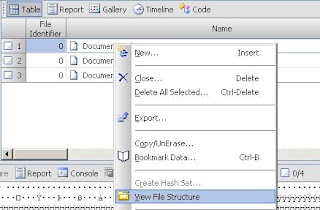
Figure 1 - Viewing Office Document "File Structure".
This also becomes a manual process viewing each document and then seeing what OLE objects are located in the document. EnCase recently came out with a way to automate the "View File Structure" process. The automated process is done with the File Mounter EnScript. This EnScript allows you to view the embedded file structure of many files such as Thumbs.db, zip archives, and Office documents (YES). Executing the process to automatically mount these types of files looks like Figure 2 below.
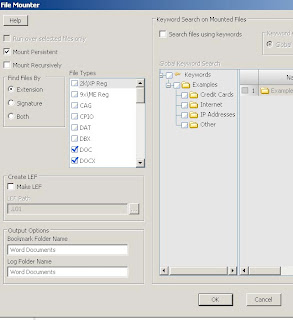
Figure 2 - Mounting Office Documents with File Mounter EnScript.
Once all the Office documents have been mounted you can extract all the OLE objects that are non-picture files with my OLExtract EnScript. Get it below.
OLExtract
This EnScript looks for all the OLENative Entries in the mounted documents and then extracts them to your EnCase default export folder. The EnScript will separate each file extracted in relation to which document it was extracted from and files with the same name will be incremented. The results of the execution of OLExtract will look similar to Figure 3 below.
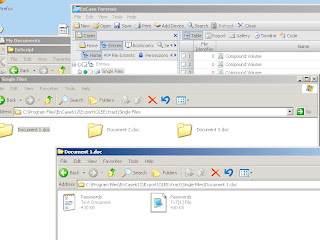
Figure 3 - Results of OLExtract
OLExtract will ignore jpegs stored as OLE objects because they are stored differently then other types of files stored in the document. You can extract jpegs easily from Office documents using file carving.

Figure 1 - Viewing Office Document "File Structure".
This also becomes a manual process viewing each document and then seeing what OLE objects are located in the document. EnCase recently came out with a way to automate the "View File Structure" process. The automated process is done with the File Mounter EnScript. This EnScript allows you to view the embedded file structure of many files such as Thumbs.db, zip archives, and Office documents (YES). Executing the process to automatically mount these types of files looks like Figure 2 below.

Figure 2 - Mounting Office Documents with File Mounter EnScript.
Once all the Office documents have been mounted you can extract all the OLE objects that are non-picture files with my OLExtract EnScript. Get it below.
OLExtract
This EnScript looks for all the OLENative Entries in the mounted documents and then extracts them to your EnCase default export folder. The EnScript will separate each file extracted in relation to which document it was extracted from and files with the same name will be incremented. The results of the execution of OLExtract will look similar to Figure 3 below.

Figure 3 - Results of OLExtract
OLExtract will ignore jpegs stored as OLE objects because they are stored differently then other types of files stored in the document. You can extract jpegs easily from Office documents using file carving.
Subscribe to:
Posts (Atom)
